
Opened 12 years ago
Closed 11 years ago
#1369 closed defect (needsinfo)
[NEEDS INFO] Renderer bug (ATI Radeon HD 5970, Windows 7)
| Reported by: | vls | Owned by: | |
|---|---|---|---|
| Priority: | Should Have | Milestone: | |
| Component: | Core engine | Keywords: | |
| Cc: | Patch: |
Description
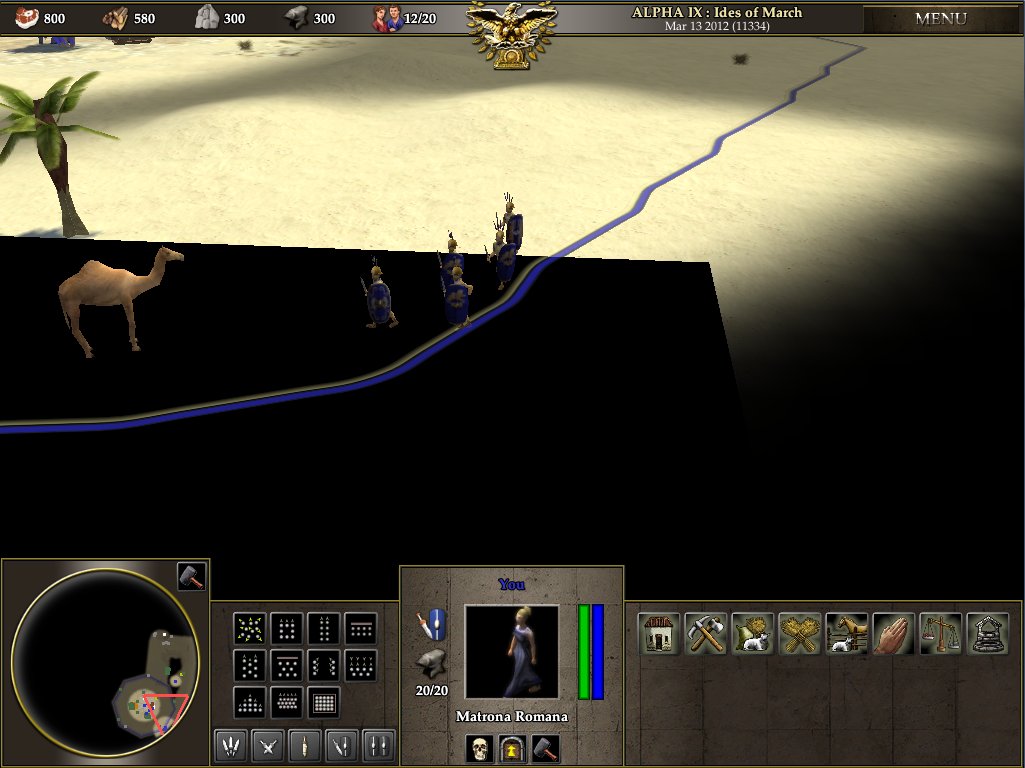
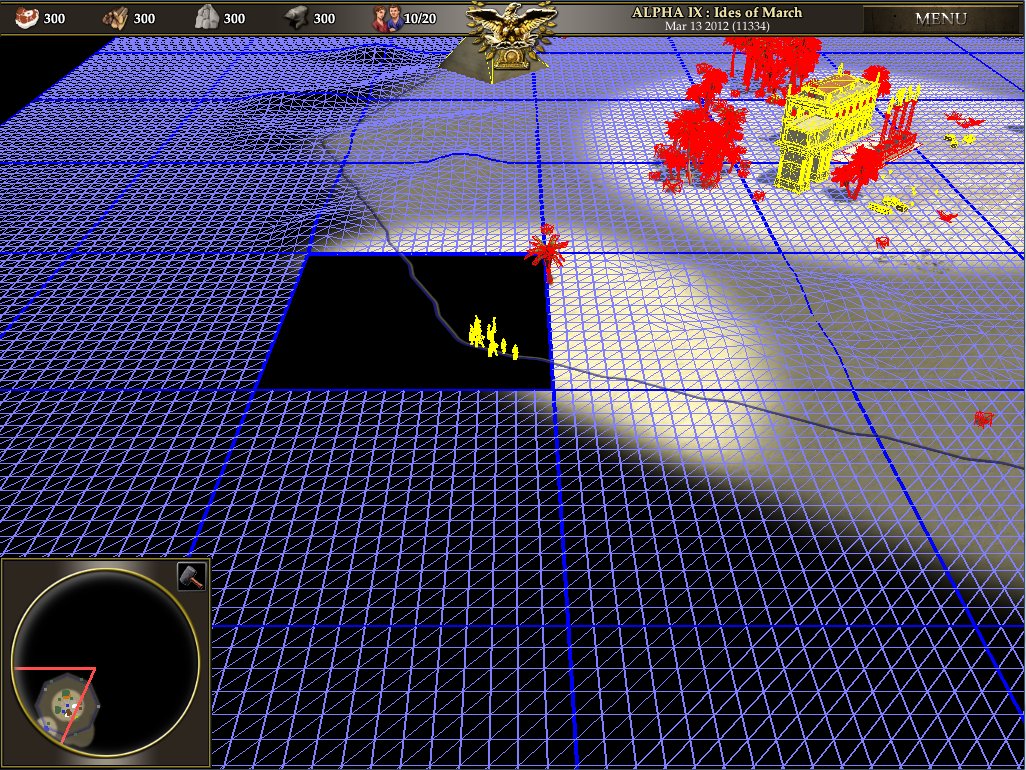
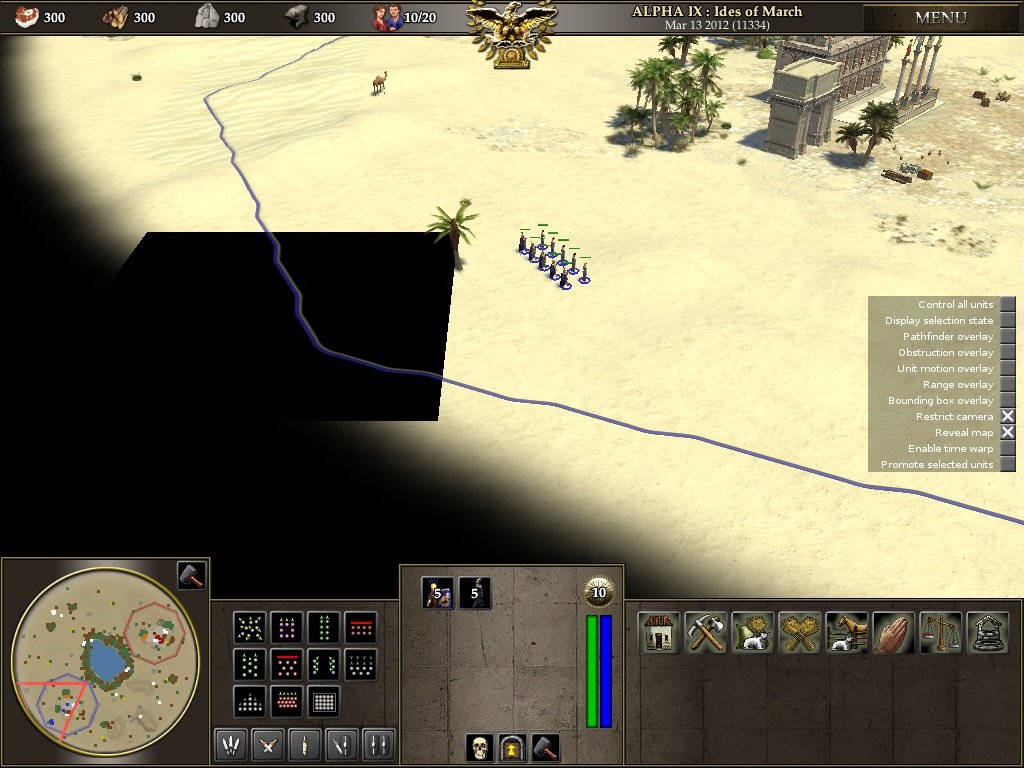
Permanent black square. This block appearing on map and don't hiding on camera rotation.
Attachments (4)
Change History (15)
by , 12 years ago
| Attachment: | 2.bug of render.jpg added |
|---|
by , 12 years ago
| Attachment: | system_info.txt added |
|---|
comment:2 by , 12 years ago
Map from Match Setup all is default.
I look on grid and grid was empty in this location.
Drivers
ATI 5970
Sorry for Russian. :)
Версия упаковки драйвера 8.961-120405a-137224C-ATI
Версия Catalyst 12.4
Поставщик Advanced Micro Devices, Inc.
Версия 2D-драйвера 8.01.01.1243
Путь к файлу драйвера 2D
/REGISTRY/MACHINE/SYSTEM/ControlSet001/Control/CLASS/{4D36E968-E325-11CE-BFC1-08002BE10318}/0000
Версия Direct3D 7.14.10.0903
Версия OpenGL 6.14.10.11631
Версия Catalyst Control Center 2012.0405.2205.37728
by , 12 years ago
| Attachment: | 4render.jpg added |
|---|
comment:3 by , 12 years ago
| Component: | Art & Animation → Core engine |
|---|---|
| Milestone: | Alpha 11 → Backlog |
comment:4 by , 12 years ago
Which version of the game?
Is it reproducible? And does the same map always have the same blank spot, or is it different sometimes?
comment:7 by , 12 years ago
Thanks for the info :) What happens if you move the camera around to other visible parts of the world? (you can reveal the whole map with Alt+D > Reveal map)
It may be a driver bug. Your ATI drivers look up-to-date, have you tried the game with slightly older drivers?
We've made renderer changes since Alpha 9, but I'm not sure they would affect this problem.
by , 12 years ago
| Attachment: | 5render.jpg added |
|---|
comment:8 by , 12 years ago
alt+d > Reveal map.
5render.jpg added
Driver change does not affect. On other maps rect not present. On VirtualBox i does not found this rect.
Cannot compile new ver, no time at all. sorry
comment:9 by , 12 years ago
If you're on Windows there's no need to compile, just checkout the SVN version (there is a prebuilt binary included). Or you can wait a couple of weeks for the next Alpha :)
If you do have the time/want to it would be nice if you could try the SVN version though so we could try and debug it in case it's something that's affecting more people/can be fixed for the next Alpha.
comment:10 by , 12 years ago
(Or if you're Ubuntu you can try the Dev PPA: https://launchpad.net/~wfg/+archive/0ad.dev )
comment:11 by , 11 years ago
| Milestone: | Backlog |
|---|---|
| Resolution: | → needsinfo |
| Status: | new → closed |
| Summary: | Renderer bug → [NEEDS INFO] Renderer bug (ATI Radeon HD 5970, Windows 7) |
Please let us know if this still occurs in the latest version of 0 A.D. and with updated drivers.




Hi! We need more information to be able to tell what might be going wrong. Can you please attach the
system_info.txtfile, which you can find in:%localappdata%\0ad\logs\~/.config/0ad/logs/~/Library/Application\ Support/0ad/logs/Issues like these are sometimes caused by driver bugs. As an initial step, can you try updating your drivers and let us know if that solved the problem?
Also, which map is that exactly?